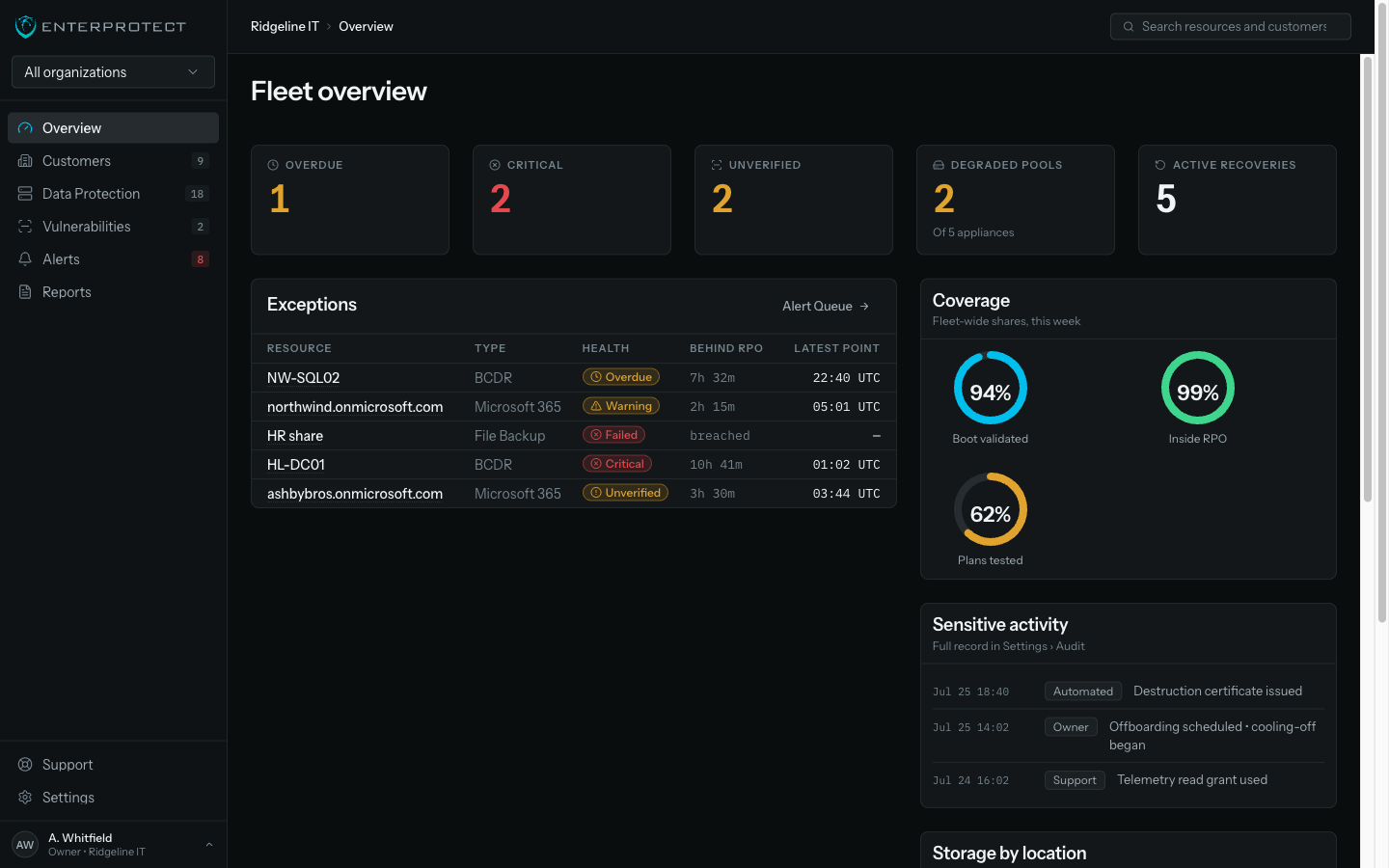
One console that shows what needs you
One alert queue across every customer, with one root-cause explanation per problem. Protection state and health stay separate, and restores end in evidence.
Three products, three consoles, one morning
Backup in one portal, M365 in another, scanning in a third. Every morning your team reconciles three queues by hand, and the exception that matters is in whichever one nobody opened first. Your best technician spends their attention on the tooling instead of the client.
Alerts nobody can triage
One failure produces a dozen notifications across two tools, so the queue trains your team to skim.
Statuses that mean different things
Green in one portal and green in another are not the same claim, and only your senior technician knows which is which.
Restores relearned every time
Each product has its own restore flow, so the technician who does it twice a year does it slowly.
How the console works
Evidence over dashboards
Signed recovery-point manifests, restore evidence exports, and destruction certificates.
Roles that mean something
Backup duty is separate from the right to read customer data. Five fixed roles, previewable before you assign them.
One restore grammar
Point picker, browse, select, destination. Learn it once for mail, files, sites, Teams and servers.
PSA ticketing built in
Create or link tickets from any alert, routed by alert type to the right board in your PSA.
Followed an old link? The security product that used to live at this address was retired. EnterProtect builds backup and disaster recovery for MSPs.
Three steps to one morning routine
Connect
Bring in a book of Microsoft tenants with one GDAP consent, and enrol machines through your RMM.
Work the queue
One alert list across every customer, grouped by root cause, with tickets routed to your PSA.
Report
Send each client evidence from the same surface your team already works in.
Questions about running it
How many people does it take to run?
The console is built for exception triage rather than browsing, so a technician opens one queue instead of visiting customers. A healthy book of business produces a short list, and that is the design goal.
Do my technicians need training for each product?
No. One restore grammar covers mail, files, sites, Teams and servers: pick a point, browse, select, choose a destination, confirm. Learning it once covers everything that follows.
Can I stop a technician from reading client data?
Yes. Five fixed roles separate backup duty from the right to read what is protected, and you can preview exactly what a role sees before assigning it.
Does it fit our PSA?
ConnectWise and CommandIT today, routed by alert type to the board you choose, with status syncing back. More PSAs follow the same pattern.
What happens when a new product ships?
It appears in the same console, the same queue, and the same reports. Products register into the platform rather than arriving as another portal to log into.
See a morning in the queue
Bring your own scenario to the walkthrough. We will run the triage and the restore, and you keep the evidence it produces. Most teams leave with a shorter morning than the one they arrived with.
What we commit to
- One console for every product, with no separate portal to log into.
- Backup duty never carries the right to read client data.
- Every restore closes with evidence you can hand to the client.
Platform resources
Platform security and immutability brief
How immutability survives console compromise, how roles are bounded, and what the evidence proves.
Brief • On request→MSP margin worksheet
Model rebilling against the posted list, volume bands, and internal-use licensing.
Template • On request→Shared responsibility checklist
The conversation to have with a client about what Microsoft protects and what you do.
Checklist • On request→Building a Business Case for Cybersecurity: A Guide for IT Professionals
Learn how to promote cybersecurity to leadership and increase investment in cybersecurity measures with this comprehensive guide for IT professionals. Download now!
Guide • PDF↓Securing RDP Connections: Protect Your Business from Cyber Attacks
With the increasing use of remote work and the reliance on RDP for remote access, it has become a prime target for cybercriminals. Our white paper provides a comprehensive guide on how to secure RDP connections and protect your business from cyber attacks.
Guide • PDF↓Cybersecurity: Understanding the Risks and Best Practices
This report provides a comprehensive overview of the risks and best practices for cybersecurity for small to medium-sized organizations. Learn how to protect your business from cyber attacks and minimize the impact of a successful attack.
Guide • PDF↓Vulnerability Management: The Missing Piece in Your Cybersecurity Puzzle
Learn the basics of vulnerability management and how to strengthen your organization's cybersecurity strategy with our comprehensive guide "Vulnerability Management: The Missing Piece in Your Cybersecurity Puzzle".
Guide • PDF↓Ransomware Incident Response Playbook
Protect your organization from ransomware attacks with our comprehensive Ransomware Incident Response Playbook. Our guide includes step-by-step instructions for identifying, containing, eradicating, and recovering from a ransomware attack.
Guide • PDF↓Ransomware Prevention for IT Pros - Best Practices for Keeping Your Company Secure
Are you an IT leader looking for strategies to prevent ransomware attacks? If so, you're not alone. Nobody likes to think about their organization's valuable data getting hijacked in a ransomware attack, but the reality is it`s happening more often than ever before.
Guide • PDF↓The Essential Guide to Hardening Windows Servers
This guide includes a detailed checklist of Windows Server hardening best practices that you can implement today to proactively secure vulnerabilities that cybercriminals could exploit.
Guide • PDF↓Free Cybersecurity Activity Book
A printable activity book that teaches the basics of staying safe online, written for children and the adults explaining it to them.
Guide • PDF↓