Microsoft 365 backup that holds nothing back
Microsoft keeps your client’s tenant running. Keeping their data recoverable is your job. Exchange, OneDrive, SharePoint, Teams and Entra ID, per protected user, storage included, retention infinite while the subscription is active.
Microsoft is not backing this up for you
Native retention windows are measured in days. A compromised admin can wipe a mailbox, and Microsoft's policies protect the tenant. Your client's four years of SharePoint are your problem, and they will not remember whose responsibility it technically was. When that call comes, it comes to you.
Retention that expires quietly
Native recycle bins hold items for days. The request arrives later.
Backup tiers with asterisks
Unlimited with a fair-use multiplier has a footnote. You find it at renewal.
Departed users, unpriced
An offboarded employee is a licence you keep paying for, or data you lose.
Complete coverage, with the limits stated
Infinite while active
Rolling immutable locks renew daily for as long as protection is active and paid. Fixed presets exist only where compliance requires deletion, never as a price lever. The locks survive a compromised console: a stolen admin session cannot shorten them.
Archived users, priced in the open
Departing employees become a named, billable, searchable state with their own terms and legal holds, never an unpriced ambiguity your renewal discovers later.
From one item to the whole tenant
Roll a tenant, a department, selected users or one workload back to a single cross-workload point. Same restore grammar as everything else.
Restores that end in evidence
Every restore closes with a signed manifest: what was recovered, verified against what, signed by whom. Your client's auditor gets a document they can file.
What a Teams restore can and cannot do
Microsoft provides no API to rewrite channel history. Restored messages land in a migration channel, and every run produces a complete evidence export.
Bulk enablement with GDAP
One partner connection enables every customer tenant your relationships cover, with no customer ceremony and no per-tenant consent chase.
Search across everything
Mail, files, sites and Teams in one index. Preview an item, restore it, or export it, and filter to what changed during an incident.
What is protected, workload by workload
Every workload family carries a stated classification. Where Microsoft has no faithful write API, this table says so.
| Workload | What is captured | How it comes back |
|---|---|---|
| Exchange Online |
|
|
| OneDrive for Business |
|
|
| SharePoint Online |
|
|
| Microsoft Teams |
|
|
| Microsoft Entra ID |
|
|
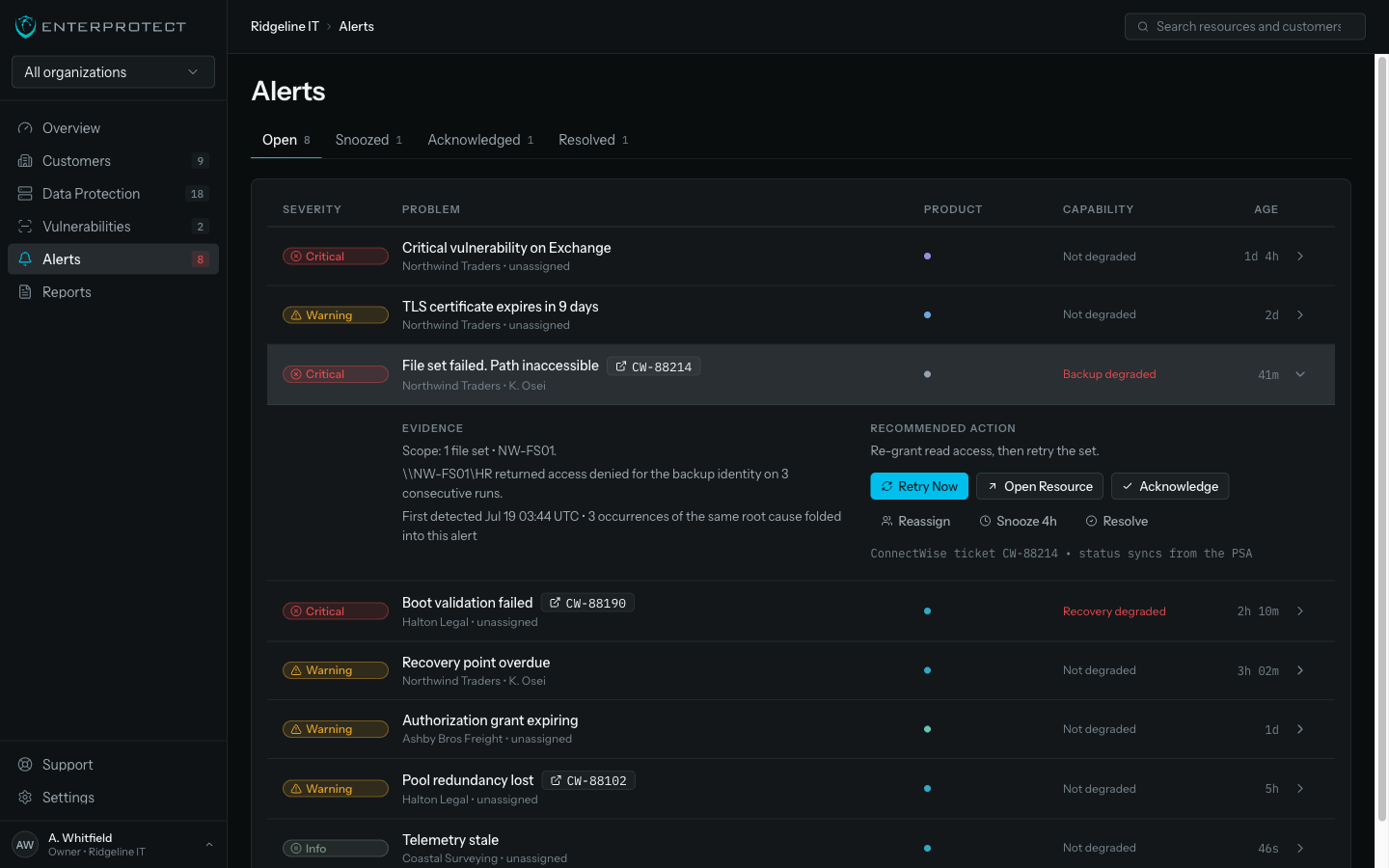
Inside the console
One queue for every customer, with the evidence attached to the alert that explains it.
Six ways back, chosen by the situation
| Mode | When you reach for it | What it protects you from |
|---|---|---|
| Browse and search | You know roughly what was lost but not exactly where | Restoring more than you meant to |
| Non-destructive restore | The user still needs what is there now | Overwriting live work |
| Original location | The item should return exactly where it was | Confusing the user with a new location |
| Alternate location | The original mailbox, site, or user is gone | Being blocked by a deleted destination |
| Signed export | Legal needs evidence, or the tenant is unavailable | Depending on Microsoft to read your own data |
| Tenant-scale rollback | An attack or a bad change crossed many users | Rebuilding a tenant by hand |
Three steps to a protected book of business
Connect
One GDAP partner consent covers every tenant your relationships already cover. No per-tenant ceremony, no credential chase.
Protect
Accept the recommended policy. Every workload starts capturing and the immutability locks begin renewing daily.
Prove
Restore an item in front of the client and hand them the signed manifest.
Your client will ask you to prove it
You hand them a signed manifest. Connect with one GDAP consent and every restore ends in evidence. The question becomes a file you send back.
What we commit to
- Retention stays infinite while the subscription is active. No tiers, no fair-use multiplier.
- Non-payment suspends service. It never shortens existing immutability.
- Limits are stated before you commit, including exactly what a Teams restore can and cannot do.
Questions buyers ask
Does Microsoft not already back this up?
No. Microsoft keeps the service running and offers short native retention windows measured in days. Recovering a mailbox a departed user deleted last quarter, or a site an attacker wiped, is the customer’s responsibility under the shared responsibility model, which in practice means yours.
What does infinite retention actually mean?
Data is retained for as long as the subscription is active and paid, with immutability locks that renew daily. There is no tier to outgrow and no fair-use multiplier waiting in a footnote. Fixed presets exist only where a compliance obligation requires deletion.
What happens to a user who leaves?
They become an archived user: a named, billable, searchable state with their own terms and legal holds. You can drop the Microsoft licence and still hold the data, and the cost is on the statement rather than hidden in a storage tier.
Can you really restore Teams?
Partly, and we state exactly which part. Teams structure, membership, configuration, and files restore properly. Channel history cannot be rewritten in place by any vendor, so restored messages land in a controlled migration destination and every run produces a complete HTML and JSON evidence package.
How is this protected if my console account is compromised?
Immutability locks cannot be shortened from the console. An attacker with administrator access, or an EnterProtect operator, cannot reduce a retention lock or destroy a recovery point inside its term.
What do I do with 200 tenants?
One GDAP partner consent covers the tenants your relationships already cover. You enable protection per customer from the console rather than visiting each tenant, and coverage reporting shows every discovered user that is protected or deliberately excluded.
Can I get the data out?
Yes, in open formats: EML with attachments for mail, native files for OneDrive and SharePoint, HTML and JSON for Teams, JSON or CSV for Entra objects, each with a manifest. Portability is a feature, not an exit penalty.
Microsoft 365 resources
Microsoft 365 Backup datasheet
Workload coverage, recovery modes, export formats, and the commercial units on two pages.
Datasheet • On request→Microsoft 365 workload coverage matrix
Every workload family with its capture and restore classification, including what is export-only and what is pending qualification.
Brief • On request→GDAP onboarding guide
Connect a partner tenant, enable a book of business, and protect the first customers.
Guide • On request→